Albinism Konnect
Designing To Save 200 000 Lives
Role
UX/UI Product Designer
Timeline
4 Months
Services
Challenge Overview
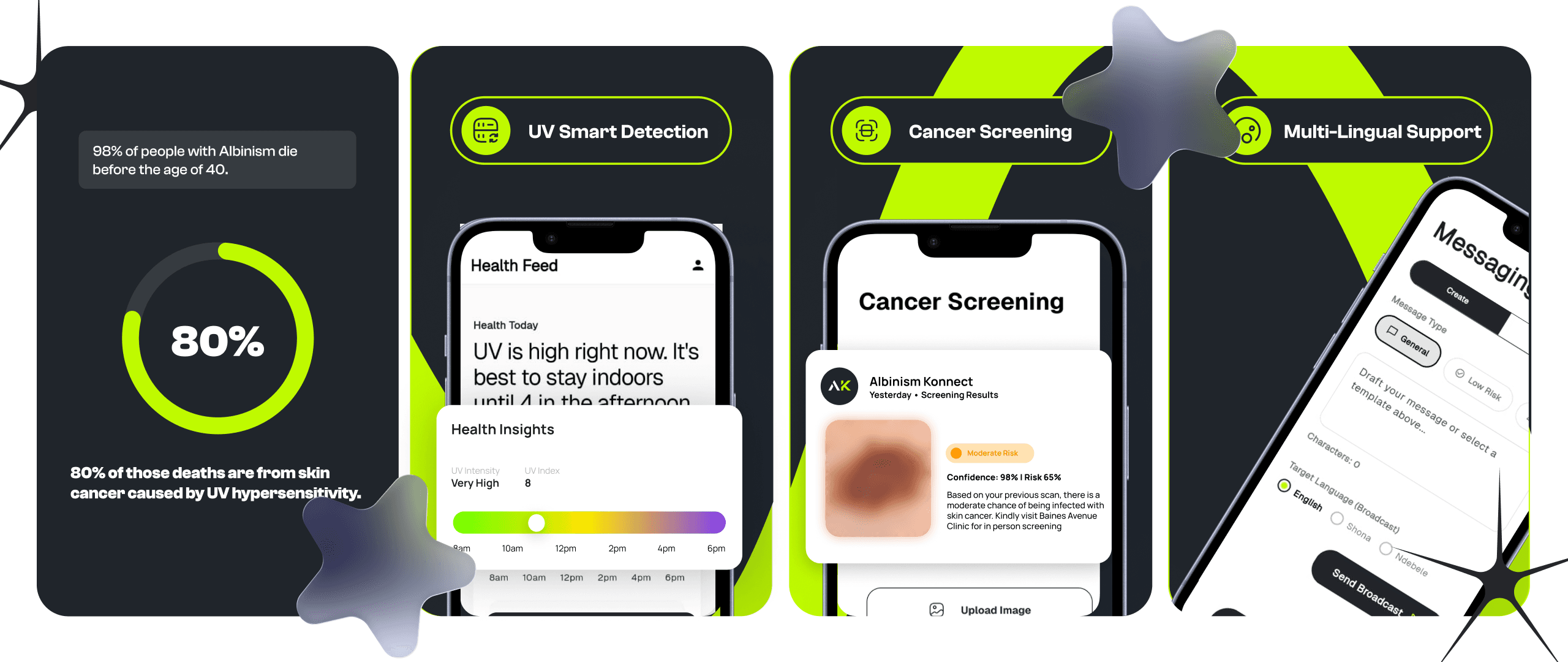
Albinism affects more than 200,000 people in Sub-Saharan Africa which means 1 in every 4,000–5,000, which is 4–5 times the global rate, with over 70,000 cases in Zimbabwe. Tragically, 98% of people with albinism in the region die before age 40, and 80% of those deaths are from skin cancer caused by UV hypersensitivity.
This presented an exciting challenge to design for saving lives. From our research findings, I discovered several critical gaps in existing solutions:
Fragmented Systems
No existing platform combines AI-based lesion classification, environmental UV risk monitoring, community health worker (CHW) coordination, and privacy-preserving edge deployment in one system.
Lack of Localization
No platform is tailored to hypopigmented skin phenotypes or delivers education in local languages (Shona, Ndebele). Digital health tools for LMICs succeed only when locally adapted.
Misaligned Focus
Existing mHealth tools target high-burden diseases (HIV, TB). NgoziYangu (Tanzania) is the only albinism-adjacent app, but it is a manual teledermatology tool with no AI classification or UV monitoring.
Proposed Solution
As a result of these findings, I embarked on a journey to create an ML-powered digital health platform offering automated skin lesion screening, real-time UV alerts, CHW referral dashboards, and multilingual education.
The ecosystem was split into two main user groups: a Dashboard App for health practitioners, and a dedicated Mobile App for people with albinism.
UX Research: Biological Constraints
"For a user with albinism, holding a phone displaying a white screen is like staring directly into a flashlight. It causes squinting, excessive tearing, and sharp physical pain."
Designing an app for people with albinism in Sub-Saharan Africa sits at the intersection of biology, accessibility, and regional technology constraints. Albinism presents major physical challenges, including severe visual impairments.
Nystagmus (The Moving Target)
An involuntary, rapid darting of the eyes. Because the fovea is missing, the brain struggles to lock onto a target, rapidly shifting the eye back and forth to construct a clear image.
Photophobia (The Pain of Light)
Extreme sensitivity to light. The iris lacks pigment and is translucent, meaning light scatters right through it, flooding the inside of the eye and causing blinding glare.
Low Visual Acuity (The Blur)
Many people with albinism have visual acuity ranging from 20/70 to 20/400. Because the issue is retinal, this cannot be fully corrected with glasses.
Why Standard UI Fails
Imagine trying to tap a 44x44 pixel 'Submit' button on a smartphone while someone is vigorously shaking your hand. Small touch targets and dense paragraphs of text become moving targets.
Furthermore, modern design heavily favors 'Light Mode' and low-contrast trends. For our users, intricate graphs or light gray placeholder text inside a white search bar disappear entirely into unreadable smudges.
Rewriting WCAG Standards
To build a truly functional product, standard accessibility guidelines weren't enough. I had to fundamentally rewrite WCAG baselines to accommodate our users' physical realities.
Expanded Touch Targets
To account for the 'tremor radius' caused by nystagmus, I pushed critical touch targets from the WCAG standard of 44x44 pixels up to 64x64 pixels, significantly reducing error rates.
Engineered Line Spacing
Cramped text forces the eye to work harder. I implemented a 1.75 - 2.0 line spacing (leading) to create enough whitespace 'rails' to prevent the user from losing their place.
Introducing: 3D Accessibility
To cater to all these factors, I coined a new UX Accessibility Standard called '3D Accessibility'. This framework builds features utilizing Sound, Gestures, and Colors for ultimate ease of use.
Sound Integration
An auto-play voice feature instantly narrates the UV status, weather updates, and doctor’s advice in local languages, bridging the gap between visual impairment and reading literacy.
Ambient Colors
The screen floods with ambient color that easily registers in peripheral vision, allowing users to understand application status even through squinted eyes.
Motion Gestures
Users can seamlessly play or pause the audio narration simply by shaking the phone, bypassing the need to hunt for a pause button.